Automation Inventory
LiveFree scan
$19 one-time for the full migration report
- Free scan: counts per object, risk flags, effort estimate
- The $19 report adds:
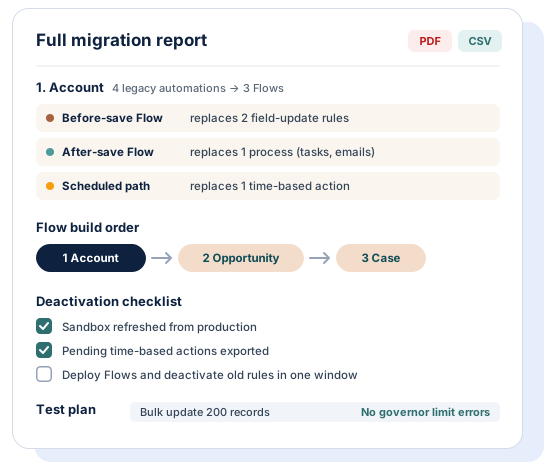
- Per-object consolidation plan
- Flow build order
- Deactivation checklist
- Test plan
- PDF + CSV
Penny's Admin Toolkit · Building in public
Drop in a metadata ZIP and see every Workflow Rule, Process Builder, Flow and Apex trigger per object, with risk flags and an effort estimate. The scan is free. Pay once only if you want the full migration plan.
Scan your automations, free See a sample report
 Free scan reads files in your browser
 PayPal checkout
 14-day refund
 No install, no org login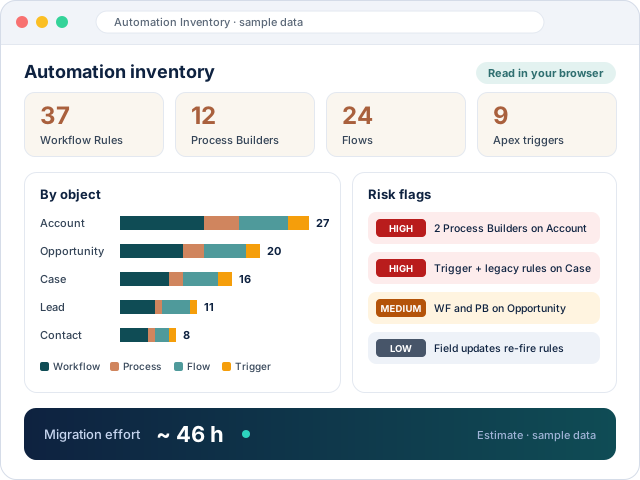
How it works
You retrieve the metadata. We read it. Nobody logs in to your org.
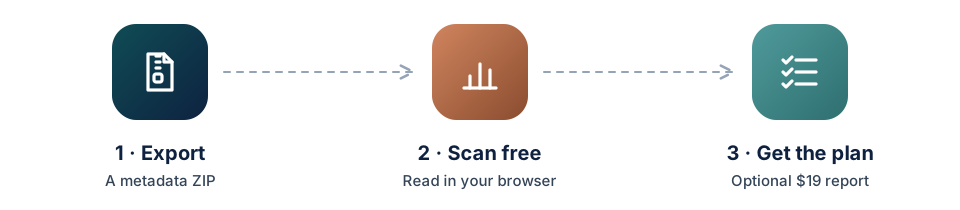
 ExportRetrieve metadata with the sf CLI, Workbench or VS Code. Step-by-step guide.
 Scan freeYour browser reads the ZIP. Nothing is uploaded for the free inventory.
 Get the planBuy the $19 report only if it helps. Pay with PayPal or a card in PayPal's own checkout.
Toolkit and pricing
All prices are one-time, in US dollars.
Free scan
$19 one-time for the full migration report
$49 planned, one-time
Not on sale yet. You cannot pay for it until it exists.
Best value
$59 planned, one-time
When the Data Dictionary launches. $9 less than both reports bought separately.
Not on sale yet.
Every paid report has a full refund within 14 days. Refund policy
Sample report
The free scan tells you what you have. The $19 report tells you what to build, in which order, and how to switch off the old automations safely.


Compare
Some options do more than we do, and the table shows where. Prices come from public pages, in USD.
| What matters | Automation Inventorythis site | KeelCadence | Freelance consultant | Elements.cloudCore | Metazoa Snapshot |
|---|---|---|---|---|---|
| Low cost for one org | YesFree scan · $19 report | Partial$149 workbook | Partial~$50–85/h | NoFrom $6,800/yr | PartialQuote only |
| No install, no org login | Yes | PartialUses your session | PartialUsually org access | NoConnected app | NoInstall needed |
| Metadata stays with you | YesScan stays in browser | PartialReads via session | PartialNeeds org access | NoSynced to vendor | PartialSee vendor |
| Whole-org view per object | Yes | Yes14-sheet workbook | Yes | Yes | Yes |
| Migration plan and Flow order | Yes$19 report | PartialHealth score | Yes | PartialAnalysis | PartialSee vendor |
| Does the migration for you | NoPlan only | NoReport only | YesHands-on | PartialAnalysis tools | YesRemediation |
| Ongoing monitoring | NoOne-time snapshot | NoOne-time | PartialIf retained | YesContinuous sync | Yes |
| No subscription | Yes | Yes | YesHourly | NoAnnual | NoAnnual license |
| What matters | Data Dictionarythis site, coming soon | Field Dump ProP0P | Data Dictionary BuilderApplication Perfection | Elements.cloudCore | Metazoa Snapshot |
|---|---|---|---|---|---|
| Available today | NoComing soon | Yes | Yes | Yes | Yes |
| Low cost for one org | Yes$49 one-time (planned) | Partial$250/yr | No$1,500/user/yr | NoFrom $6,800/yr | PartialQuote only |
| No install | Yes | NoAppExchange app | NoAppExchange app | NoConnected app | NoInstall needed |
| Metadata stays with you | PartialPlanned: in browser | YesRuns in your org | YesRuns in your org | NoSynced to vendor | PartialSee vendor |
| Live, editable in Salesforce | NoSnapshot document | PartialRe-run any time | YesBulk-edit fields | PartialIn platform | PartialReports |
| No subscription | Yes | NoAnnual | NoAnnual | NoAnnual | NoAnnual license |
How to
You need a ZIP of your retrieved metadata. Pick the tool you already use.
Copy the ready-made package.xml from the export guide.
Run this command in a folder that contains the package.xml:
sf project retrieve start --manifest package.xml --target-metadata-dir outUse the ZIP in the out folder. If you get a folder instead, compress it into a ZIP.
Retrieve with the same package.xml in Workbench or in VS Code with the Salesforce Extensions. Then zip the result.
Open Automation Inventory and drop the ZIP. Your browser reads it.
FAQ
No, not for the free scan: your ZIP is read by JavaScript in your browser and nothing is sent to a server. If you buy the $19 report, only a summary (object names, automation names and types, active and time-based flags, counts and risk flags) is sent, never the files, and it is deleted after 90 days.
No. There is no managed package, no connected app and no org login. You export metadata yourself and drop the ZIP into the page.
No, it complements it. Migrate to Flow converts one Workflow Rule or Process Builder at a time; the Automation Inventory shows everything that is left, where automations overlap on the same object, and the order to rebuild them in, so you know what to feed into Migrate to Flow.
Salesforce ended support for Workflow Rules and Process Builder on December 31, 2025. They still run, but Salesforce no longer fixes bugs in them, so an inventory tells you how much unsupported automation your org still depends on.
A metadata ZIP from your org. Download our package.xml and retrieve it with Workbench, VS Code or the sf CLI; a sandbox works as well as production and retrieving metadata changes nothing in the org.
The scan is free. The full migration report is $19 USD, one time, paid through PayPal's own checkout with a PayPal balance or a card. There is no subscription. The Data Dictionary ($49) and the bundle ($59) are planned and not on sale yet.
If the report does not help, email us within 14 days with your PayPal order ID for a full refund to your original payment method. No forms.
No. The toolkit is built by Industrious CRM, a Salesforce consultancy, with AI assistance. It is not affiliated with or endorsed by Salesforce.
Yes. Agents can read /llms.txt, the plain /agents page and the machine-readable /api/catalog.json, which list each product, its price, the input it needs and how purchase works. Payment currently needs a human to approve it in PayPal checkout.
Open stats
We share real numbers as they come in. Nothing here is seeded or estimated.
 Launched October 2026 · building in public. We'll show live counts of inventories run, reports bought and downloads once there are enough to be meaningful.
45/100
Live site before this redesign · measured 2026-10-20
How findable this site is for AI search and agents: our own repeatable technical check (0 to 100) plus a panel of real buyer questions. Agent details · stats.json
Only verified buyers can review, and every review is checked before it appears. No reviews yet, so nothing is shown.
Paid reports have a full refund within 14 days. Refund policy