


From CPQ to Revenue Cloud
About this guide
This guide is for revenue operations, IT and finance leaders at mid-size and enterprise organizations that run Salesforce CPQ and Salesforce Billing (the managed packages, sometimes still called SteelBrick). It explains what Salesforce's newer revenue platform is, why moving to it is a re-implementation rather than an upgrade, and how to plan a phased, low-risk transition.
How to read the numbers. Facts about Salesforce products in this guide were checked against official Salesforce sources (Salesforce Help, the Revenue Management Developer Guide, Trailhead and salesforce.com) in October 2026. Durations, percentages and effort splits are Industrious CRM's experience-based planning estimates. They are marked as estimates where they appear. Your org will differ, which is why the guide keeps coming back to measuring your own org before you commit to a plan.
Executive summary
Salesforce CPQ and Salesforce Billing have run the quote-to-cash process for thousands of companies for about a decade. Both managed packages are now end of sale. Salesforce no longer sells them to new customers and is no longer developing new features for them. Existing customers keep full support, can renew and can add licenses, and Salesforce has not announced an end-of-life date. New investment, including AI and agent capabilities, is going into Revenue Cloud: a native, attribute-based, API-first rebuild of the quote-to-cash stack on the core Salesforce platform.
It is tempting to treat this as a version upgrade or a data migration. It is neither. There is no in-place upgrade, and Salesforce's own migration guidance says the move changes how you model data, design business processes and govern data. Data-migration tools exist, from partners and on Salesforce's roadmap. Your pricing logic, scripts, integrations and billing configuration still have to be redesigned on new engines. In short, you are re-implementing your quote-to-cash logic, not migrating your quote-to-cash data. That reframing is the most important idea in this guide.
Moving to Revenue Cloud is a re-implementation of your quote-to-cash logic, not a migration of your quote-to-cash data.
The good news is that a deliberate transition is a chance to retire years of configuration debt, shrink a bloated catalog and land on the platform Salesforce is investing in. The honest news has two parts. Salesforce describes a typical migration as 3–6 months; in Industrious CRM's experience a complex enterprise org usually needs about 6–12 months (Industrious estimate) once you count the build, testing, data migration and a dual-run billing period. And roughly 40–60% of the effort (our estimate) goes into untangling everything in your org that depends on the old packages, not into building the new product. Where your org sits in that range is something you can measure.
This guide covers what Revenue Cloud is, why it differs, and a phased strategy for getting there without a billing outage, an audit finding or a corrupted revenue number. It closes with a free, read-only way to see what a re-implementation would involve for your own org.
Chapter 1
The sunset, and why "later" is the expensive option
End of sale is not end of life, but your platform has stopped getting better.
Salesforce has ended new sales of the Salesforce CPQ and Salesforce Billing managed packages. This is end of sale, not end of life. Existing customers keep their licenses, support and renewals, Salesforce has not announced a shutoff date, and nobody is being forced to migrate. The direction is still clear: new features, new AI capabilities and the platform roadmap go to Revenue Cloud, not to the legacy packages. Each quarter you stay on CPQ, your revenue platform stands still while the rest of Salesforce moves ahead around it: Data 360 (formerly Data Cloud), Agentforce and the core data model.
With no deadline, waiting can feel free. In our view, "we'll deal with it later" is the most expensive stance a revenue leader can take, for three reasons.
First, the work is long. If a complex enterprise transition can take the better part of a year, a program you haven't started leaves you no slack for business events: an acquisition, a pricing-model change, or a future change in Salesforce's support terms. You don't want to run this project under pressure, cutting corners on reconciliation because time ran out.
Second, every month adds to what you will have to move. Legacy CPQ orgs keep getting more complex: new price rules, new bundle variations, another Quote Calculator Plugin tweak, one more integration reading an SBQQ__ field. The dependencies you will eventually refactor keep growing while you wait. Starting a plan puts a ceiling on that growth.
Third, experienced people are in demand. Every CPQ customer is facing the same decision. The pool of practitioners who have actually delivered Revenue Cloud re-implementations, not just read the release notes, is still small. Early movers get experienced teams and calm timelines.
Acting now does not mean cutting over now. The right first step is a short, low-cost assessment that measures your org and produces a plan you can defend. That is how you turn an open-ended platform risk into a scoped, budgeted program.
Chapter 2
What Revenue Cloud actually is
The destination isn't a newer version of where you are. Three architectural shifts define it.
To plan the journey, you have to understand the destination. Three architectural shifts set Revenue Cloud apart from the packages you run today.
It is native to the core platform, not a managed package
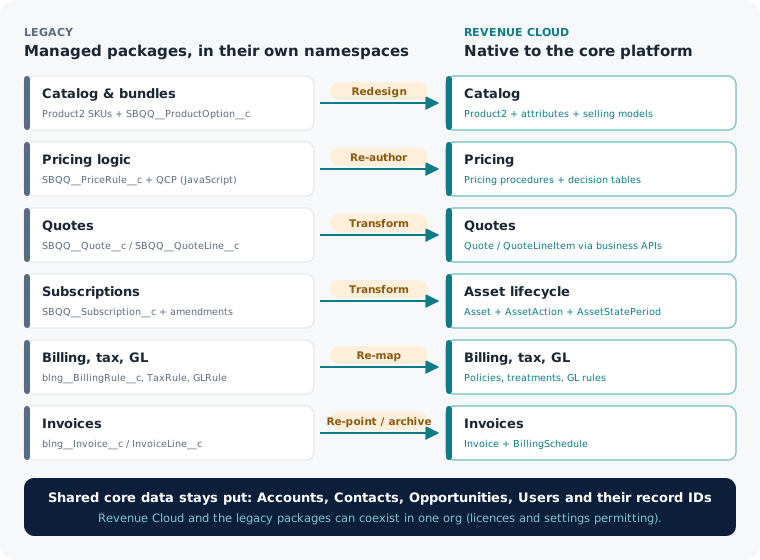
Salesforce CPQ and Salesforce Billing are managed packages. Everything they do lives inside their own namespaces: SBQQ__ for CPQ and blng__ for Billing. Their objects, fields and logic sit in a walled garden bolted onto your org.
Revenue Cloud is built into the core Salesforce platform. It uses standard objects such as Product2, Quote, Order, Asset and Invoice, plus a family of newer standard objects for catalog, pricing, asset lifecycle, billing and finance. Salesforce describes it as API-first and composable, so teams can adopt pricing, quoting, ordering or billing incrementally.
This has a useful consequence: Revenue Cloud can coexist with the legacy CPQ and Billing packages in the same org. Salesforce documents the requirements: the Revenue Cloud Advanced and Revenue Cloud Billing licenses, Billing in Revenue Cloud enabled, and the CPQ and Billing packages provisioned. You don't need a new Salesforce instance. You keep your Accounts, Contacts, Opportunities and their record IDs, along with existing Marketing Cloud, Data 360 and Experience Cloud integrations. Revenue Cloud stands up alongside CPQ and Billing, and you move across deliberately. Coexistence is what makes a safe, phased cutover possible. It is also why a brand-new org is rarely the right answer for an established enterprise.
It is attribute-based, not built on SKU explosion
Legacy CPQ modeled variation mostly by adding more products. One offering sold in three tiers, two terms and four regions could become dozens of SKUs, each with its own rules and price entries. Over the years, catalogs grow to thousands of products that are really a handful of offerings.
Revenue Cloud makes attributes first-class in the product catalog. Instead of a separate SKU for every combination, you model one product and describe how it varies (tier, term, region, capacity) with attributes that drive configuration and pricing. Salesforce's migration guidance recommends consolidating product variants into attribute-based products. In our experience, catalogs often shrink substantially, sometimes by most of their SKU count, though the reduction depends entirely on your catalog (estimate). The twin-field and shadow-SKU workarounds that CPQ teams built to imitate attributes can be retired.
Alongside attributes sits the concept that governs everything downstream: the Product Selling Model. Salesforce defines three selling model types: One Time, Term Defined and Evergreen. In CPQ, whether something was a subscription, a fixed term or a one-time sale was spread across many fields and flags. In Revenue Cloud, those semantics live in an explicit selling model that pricing, billing and asset lifecycle all read. It is the most important new concept to understand, because getting the selling model right is a precondition for correct pricing and correct billing.
It is one connected, engine-driven, API-first quote-to-cash
CPQ and Billing were two packages stitched together. Revenue Cloud is designed as one connected lifecycle: catalog, configuration, pricing, quoting, ordering, asset management, billing and finance on a shared data model, driven by runtime engines and pricing procedures.
Two things follow from that. First, Revenue Cloud is API-first. Quotes can be created and priced through business APIs such as Place Quote, which can call the pricing engine as part of the request. Pricing comes from the engine and its procedures, not from rows you write to a table. Second, the pricing engine reads decision tables, which are compiled lookup structures. Price and catalog data you load isn't visible to pricing until the relevant decision tables are refreshed. Salesforce's own setup steps include running Sync Pricing Data and refreshing decision tables such as Price Book Entries. This is the architecture working as designed, and respecting it is the difference between a data load that reports success and a quoting screen that actually works.
The behavior lives in engines and procedures, and those have to be built, not copied.
This engine-driven design makes Revenue Cloud powerful and extensible. It is also why you can't treat it as "CPQ with new field names."
Chapter 3
The hard truth: this is a re-implementation
Tools can move data. They can't move your logic.
Any partner who softens this point is selling you risk: no tool carries your quote-to-cash logic across intact. How you configure bundles, price, discount, bill and recognize revenue has to be rebuilt on new engines. Salesforce and its partners offer data-migration tooling, and Salesforce lists partner tools such as Forsys RevRamp, IdeaHelix and Prodly. Salesforce Help is explicit that tools don't replace design decisions, especially for custom logic and integrations. This is a transformation project disguised as a migration project.
Here is what re-implementation means at each layer:
- Pricing rules are re-authored, not converted. Legacy price rules (
SBQQ__PriceRule__c, with their price conditions and actions) become Revenue Cloud pricing procedures and decision tables. You don't translate a rule. You re-express what it was meant to do in a different engine, ideally starting from the default pricing procedure and building outward. Because nothing converts rules while guaranteeing the same behavior, you have to verify behavior rather than assume it. - Quote Calculator Plugin JavaScript doesn't carry over. If your org relied on the QCP for custom pricing math, as most mature CPQ orgs do, that JavaScript has no direct equivalent in Revenue Cloud. Salesforce positions declarative pricing procedures and elements as the replacement. The logic has to be recovered, understood and rebuilt.
- Subscriptions become asset lifecycle, and this is the hardest transformation in the program. Legacy
SBQQ__Subscription__crecords, with their long chains of amendments and renewals, become Assets whose history is recorded in asset lifecycle objects such asAssetActionandAssetStatePeriod. You aren't copying subscriptions. You walk each amendment chain from origin to present, net it to its true current state, and rebuild its history in a new model. Get a date or amount wrong and you won't see an error. You'll get quietly wrong ARR and broken renewals. - Billing, tax and accounting configuration is re-mapped, not lifted. Billing rules become billing policies and billing treatments. Tax rules become tax policies and tax treatments, with an external tax engine connected through an adapter where you use one. GL rules become general ledger accounts and GL account assignment rules, organized around legal entities and accounting periods. Each of these is a hand-mapped, deliberate rebuild on a new finance backbone.
Why does this matter so much for planning? A data-migration mindset budgets for moving rows. This project's cost and risk are in rebuilding logic and proving it produces the same money. Teams that treat it as a data migration discover the re-implementation halfway through, after the budget and timeline were set against the wrong model. Price the rebuild honestly up front and the rest of the program becomes manageable.
The hard truth has an upside. A re-implementation is a rare chance not to carry forward a decade of accumulated clutter: dead rules, abandoned bundles, workarounds on top of workarounds. Done well, you finish leaner than you started.
| Legacy CPQ & Billing | Revenue Cloud | What it takes |
|---|---|---|
Product2 SKUs + SBQQ__ProductOption__c bundles | Product2 with attributes, bundles and Product Selling Models | Redesign the catalog; consolidate variants into attributes |
SBQQ__ProductRule__c (configuration rules) | Constraint-based configuration rules | Rebuild and test |
SBQQ__PriceRule__c, discount schedules | Pricing procedures + decision tables | Re-author; prove parity deal by deal |
Quote Calculator Plugin (JavaScript) | Declarative pricing procedures and elements | Recover the business rules, then rebuild |
SBQQ__Quote__c / SBQQ__QuoteLine__c | Quote / QuoteLineItem | Transform open quotes only |
SBQQ__Subscription__c + contract amendments | Asset + AssetAction + AssetStatePeriod | Net each amendment chain to its current state; reconcile |
blng__BillingRule__c | Billing policies + billing treatments | Re-map by hand |
blng__TaxRule__c | Tax policies + tax treatments (plus engine adapter if used) | Re-map by hand |
blng__GLRule__c | GL accounts + GL account assignment rules, legal entities, accounting periods | Re-map with Finance |
blng__Invoice__c (history) | Archive, locked with original amounts | Never regenerate closed or posted periods |
Open subscription term | Invoice + BillingSchedule generated forward | Set the billed-through date; prove in the dual run |
Reports & dashboards on SBQQ__ / blng__ | Reports on Revenue Cloud standard objects | Recreate (Salesforce Help says so explicitly) |
Chapter 4
A phased strategy: strangle, don't big-bang
Stand the new system up beside the old one, prove it on a thin slice, then grow.
No responsible team moves an enterprise's entire revenue engine in one weekend. The proven pattern is the strangler: stand up the new system beside the old one, route a thin slice of real business through it, prove it works, then move segments across until the legacy system has nothing left to do. Salesforce's own rollout options include Bridge (route new business to Revenue Cloud while existing CPQ contracts run to renewal) and Cohort-based rollouts by geography, business unit, channel or selling model. Coexistence makes this safe, with the legacy packages kept live and read-only as a rollback and audit path the whole way.
Here is the shape of a well-run program. Durations are Industrious CRM's planning estimates.
Phase 0: Assess (about 6–10 weeks, our estimate)
A focused discovery that ends with a design freeze on the object-model mappings and a costed plan. In this phase you probe the target org to see what its release and licenses actually support (more on that in Chapter 9), inventory every dependency, and settle the decisions that are expensive to revisit: the revenue-recognition system of record, the payment-gateway end state and the archive strategy. The deliverable is a plan you can defend. This phase alone turns an open-ended platform risk into a scoped program, which is why it's the right first step even for teams not ready to commit to the full build.
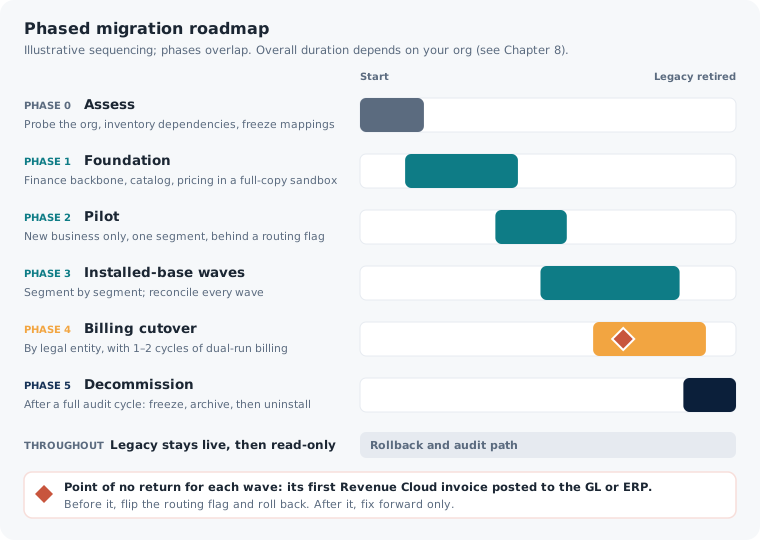
Phase 1: Foundation
Enable Revenue Cloud alongside the legacy packages. Build and reconcile the finance backbone (legal entities, accounting periods, GL, tax), the catalog (products, attributes, selling models, categories) and pricing (price books keyed to selling models, adjustment schedules, pricing procedures), all in a full-copy sandbox. Wire the required post-load steps, especially pricing data sync and decision-table refresh, into an automated pipeline so nobody can forget them. Nothing goes to production. This phase proves the new system can be built and priced correctly before any customer touches it.
Phase 2: Pilot on new business
Route new business only, for one segment, through Revenue Cloud behind a routing flag. This is the first real-world proof: new quotes, orders and assets created cleanly in the new engine, while the legacy system carries on for everyone else. It surfaces the gaps a sandbox can't, on the lowest-risk group: deals with no legacy history to reconcile.
Phase 3: Migrate the installed base, in waves by segment
Now move existing customers, in segment-sized waves, never all at once. Each wave converts that segment's subscription amendment chains into assets, reconciles the money to the penny (see Chapter 5) and cuts those accounts over. The cardinal rule is that an account is amended in exactly one system. When an account migrates, it moves from legacy to Revenue Cloud and never sits in both. Small waves keep the impact of any problem contained and every rollback cheap.
Phase 4: Billing cutover, by legal entity, with a dual run
Billing cuts over on the finance close calendar, usually one legal entity at a time, so each entity's books cross the boundary cleanly. In this phase you set each active subscription's billed-through date so Revenue Cloud generates the correct remaining periods. You also run parallel shadow billing for one or two cycles: Revenue Cloud and the legacy system both generate invoices, and every invoice is compared automatically until there are zero unexplained differences. Open receivables are collected in the legacy system. Finance signs off before the shadow period ends.
Phase 5: Decommission
Once a segment or entity is fully cut over and a full audit cycle has passed, freeze the legacy footprint as read-only and archive it. Only then consider uninstalling the managed packages. Uninstalling a managed package permanently deletes its components and its data (Salesforce offers an optional export of package data at uninstall time). Uninstalling is the very last step, after everything is reconciled, archived and signed off. It is never early tidying up.
The point of no return for any wave is the first Revenue Cloud invoice posted to the general ledger or ERP.
One rule runs through every phase: the point of no return for any wave is the first Revenue Cloud invoice posted to the general ledger or ERP. Before that point, rolling back means flipping the routing flag and deleting the wave's records in reverse dependency order. After it, you can only fix forward. That is why waves are small and why the cleanest, friendliest segment goes first.
Chapter 5
The data strategy: migrate active, archive history, never regenerate closed periods
Bring across what you still transact on. Lock away what's already posted.
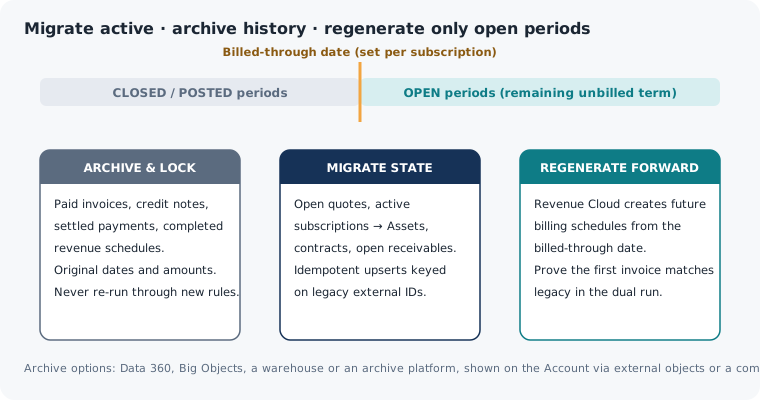
The instinct to "bring all our data across" is the most expensive instinct in this program. The right strategy is disciplined and, at first, counterintuitive: migrate only what is active, archive the history, and never regenerate closed financials.
Migrate only active, in-flight data
Revenue Cloud should receive what the business still transacts on: open quotes, active subscriptions and contracts, and open receivables. Closed quotes, fulfilled orders, paid invoices and completed revenue schedules don't belong in the new operational system. They're finished. Loading them costs months of effort and contaminates the ledger, and buys you nothing.
Archive history outside the engine
Archive historical invoices, credit notes, settled payments and revenue schedules. Don't migrate them into Revenue Cloud's live objects. Practical archive options include Data 360, Big Objects, a data warehouse or a dedicated archive and backup platform. Historical records can be shown on the Account page through external objects or a Data 360-powered component, with PDF copies kept in Files for anyone who needs the original document. Users keep visibility, and the operational engine stays clean.
Never regenerate a closed or posted period
State this rule precisely, because the loose version ("never regenerate anything") is both wrong and paralyzing. The rule is: never regenerate a CLOSED or POSTED period. Never run today's pricing, tax, proration or revenue-recognition rules against yesterday's posted transactions. Rates, rules and tax jurisdictions change. Run a two-year-old posted invoice through today's engine and you'll get a different number, and a different number on a closed-period financial record is an accounting problem. Closed and posted invoices and revenue schedules are immutable. Archive them with their original dates and amounts, and lock them.
Never run today's pricing, tax or revenue rules against yesterday's posted transactions.
Regenerating forward, still-open schedules, meaning the remaining unbilled term of an active subscription, is correct and expected. You migrate the asset and order state from the legacy subscription and order, set the billed-through date, and let Revenue Cloud generate the future billing and revenue schedules. Then you confirm that its first invoice matches what the legacy system would have produced. Regenerating open-period schedules this way doesn't break the rule. It's the intended mechanism, and the dual run in Phase 4 exists to prove it lands to the penny.
Idempotence is the safety net
Every migration touches production data, and every migration will be re-run. So build every load to be idempotent. Each target object carries a unique external-ID field pointing back to its legacy record, and every load is an upsert keyed on that ID. Run it twice and the second run changes nothing instead of creating duplicates. For objects created through API actions rather than direct writes, keep a legacy-to-new ID map in an external store. During loads, an explicit migration mode setting bypasses the triggers, flows and validation rules that would otherwise start live billing mid-load. This control framework turns a frightening one-shot cutover into an operation you can rehearse, repeat and reverse.
Every wave closes the same way. Reconcile row counts. Reconcile financial control totals (ARR, MRR, open AR and tax) to the penny. Run stratified deep comparisons on samples. Then get Finance's signature. No wave proceeds on trust.
Chapter 6
The dependency refactor
The biggest body of work isn't building Revenue Cloud. It's everything that depends on CPQ.
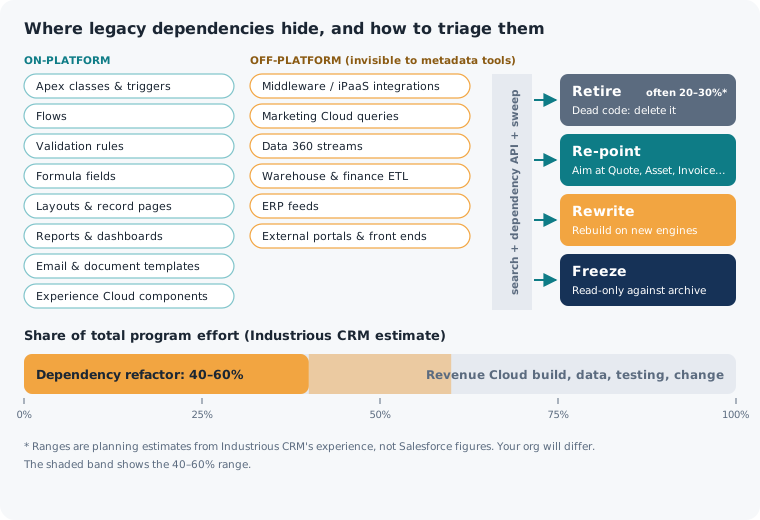
First-time planners are usually surprised by this, and it separates a realistic budget from a fantasy one. In our experience, the largest body of work in a CPQ-to-Revenue Cloud program isn't building Revenue Cloud. It's refactoring everything in your org that depends on the old system. We typically see this at 40–60% of total effort (Industrious CRM estimate), and it is the most common reason programs run long.
Over the years, references to SBQQ__ and blng__ objects and fields spread everywhere: Apex classes and triggers, flows, validation rules, formula fields, page layouts and record pages, Experience Cloud components, reports and dashboards, email templates and document templates. Salesforce's migration guidance confirms that reports and dashboards built on CPQ objects must be rebuilt on Revenue Cloud's standard objects. Critically, the references also spread off-platform: into middleware integrations, Marketing Cloud queries and data extensions, Data 360 streams, the warehouse feeds that serve Finance, and external front ends. Each one ties you to the old system, and each must be found, understood and dealt with before that system can be retired.
Search the metadata yourself
Salesforce's dependency API (the MetadataComponentDependency Tooling API object) is useful, but Salesforce documents it as a beta feature with query limits, and its coverage isn't complete. It also can't see anything off-platform. The only reliable inventory comes from retrieving all the metadata, searching it for the legacy namespaces, cross-checking against the dependency API, and then deliberately hunting down the off-platform connections that no metadata search will find. An inventory that trusts only the API will miss exactly the dependencies that cause a production incident three months after you thought you were done.
Triage with the three R's, plus Freeze
Once you find a dependency, classify it:
- Retire. Dead code and abandoned automation that should just be deleted. In our experience this is often 20–30% of what you find (estimate). The migration is your chance to clear it out.
- Re-point. Redirect it from the legacy object to its Revenue Cloud equivalent (Quote, QuoteLineItem, Asset, Invoice).
- Rewrite. Re-implement its logic on the new engines, as with QCP or complex price rules.
- Freeze. Leave it read-only against the archive. This suits things that only ever looked backward.
De-risking the refactor
Three practices keep the refactor from swallowing the program.
- Do the inventory in Phase 0, so the true scope is known before anyone commits to a date. A surprise found in discovery is a budget item. A surprise found at cutover is an incident.
- Build an anti-corruption layer. Put clean service interfaces (a quoting service, a billing service) in front of both implementations and route between legacy and Revenue Cloud with a configuration flag. That makes the strangler cutover switchable and rollback cheap, and downstream code talks to a stable interface instead of hard-coding either system.
- Keep custom automation off the pricing path. Extend the pricing procedure, not a trigger, so a field rename or a decision-table change can't silently break quoting. Track which fields your active decision tables read, and block renames of those fields in your release pipeline.
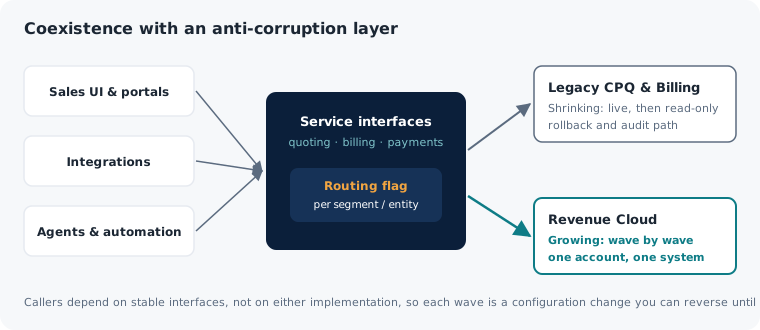
Own the dependency layer and you own the program's biggest risk. Underestimate it and it owns you.
Chapter 7
Payments and gateways: less scary than it looks
It's usually reference re-linking, not re-tokenization.
Finance and security leaders tense up at the words "migrate payments." They picture asking every customer for their card details again. For the common pattern, where a third-party gateway stores payment credentials as tokens, there is reassuring news: there is usually nothing to re-vault.
The reason is architectural. In a token-based gateway integration, sensitive payment credentials live in the gateway's vault, not in Salesforce. Salesforce holds only references to them, such as customer and payment-method tokens. So a payment migration is mostly re-linking references, not re-tokenizing cards. No card data is touched, no customer is asked for anything, and your PCI scope doesn't grow. Confirm this against your own gateway setup during Phase 0.
That turns the payment question from a frightening data migration into a manageable integration task, and it opens three clear paths:
- Coexist first (our recommended default). Keep the existing gateway integration in charge of payment storage, checkout and transactions. Just re-point its invoice link from the legacy
blng__Invoice__cto the standard Revenue CloudInvoice. Payments keep flowing through the same processor with the same stored credentials. Only the Salesforce object they attach to changes. Treat replacing the gateway with Salesforce's native payments capabilities as a later, separate program, not a risk you take on during billing cutover. We generally recommend keeping the incumbent gateway live until billing has been stable for a good while, often a year or more (our recommendation). - Replace with native, deliberately, much later. If consolidating on Salesforce's native payments is the strategic goal, plan it as its own project. The thing to protect is the stored-credential and merchant-initiated-transaction data the processor holds, such as network transaction IDs. A replacement that loses that mapping can quietly lower authorization rates on recurring charges. Watch especially for a change of merchant of record, merchant ID or gateway account, which is what typically breaks token portability.
- Hybrid: new methods native, existing ones stay. A practical middle path is to route new payment methods through the native path while existing stored methods stay in the incumbent gateway, then migrate tokens in phases. You get a native footprint without a big-bang re-vault. Schedule token moves around any merchant-of-record change, not across it.
All three paths share one guardrail: a single payment-application router keyed on each invoice's source system, so a payment is never applied automatically in both engines. Double application is a reconciliation nightmare, and a single router prevents it by design.
Chapter 8
Realistic timelines, and what actually drives them
The timeline isn't a fixed cost. It's a profile you can measure.
Everyone asks for the number first, so here it is with its sources. Salesforce describes a typical CPQ-to-Revenue Cloud migration as 3–6 months from discovery to go-live, with complex implementations (extensive custom logic, large catalogs, many integrations) taking longer. Industrious CRM's estimate for complex enterprise orgs is about 6–12 months (Industrious estimate). The extra time isn't the build alone. It comes from testing (pricing, amendments, renewals and invoices all need regression proof), data migration and reconciliation, and a dual-run period where legacy and new billing run side by side until the invoices match. Leaner orgs land inside Salesforce's 3–6 month range.
The heaviest orgs (millions of transaction rows, hundreds of Apex classes and flows, dense off-platform integrations, years of QCP logic) sit at the top of that range, and can run past it if payment-gateway replacement is pulled into scope, which is one reason we recommend keeping it separate. A short estimate isn't wrong in itself. It's wrong for the wrong org. When you're given a number, ask what profile it assumes and what it leaves out.
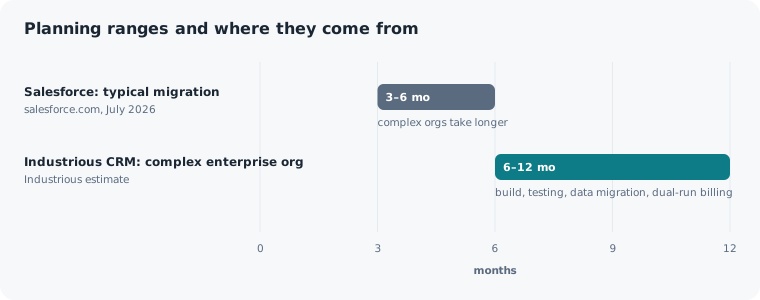
More useful than the range is knowing what sets your position in it, because these are levers you can measure and sometimes influence.
The renewal and contract cycle. You move the installed base in waves, and waves naturally follow how customers renew. A book of business on annual renewals can't be moved faster than those renewals come due without amending contracts mid-term, which you want to avoid. Your renewal cadence sets a floor on how quickly the installed base can responsibly move.
The finance close. Billing cuts over on the finance calendar, by legal entity, with a parallel shadow period of one to two full billing cycles. That shadow period isn't padding. It's how you prove Revenue Cloud bills correctly before you trust it with real money. Your billing cycle length and number of legal entities directly set how long billing cutover takes.
The dependency footprint. This is the big variable that Chapter 6 warned about. An org with a few dozen clean customizations moves far faster than one with hundreds of Apex classes, dense flows, off-platform integrations and years of QCP logic. The Phase 0 dependency inventory, more than anything else, tells you where in the range you actually sit. It replaces a guess with a measurement.
Data volume and complexity. The transform-and-load step, especially converting subscription amendment chains into assets, scales with volume and messiness. A high-volume, heavily amended subscription base takes longer to reconcile to the penny. Rehearse it in a full-copy sandbox, and the rehearsal timing becomes the plan for the real cutover window.
A program with a measured timeline is a program you can staff, budget and de-risk.
The takeaway: your timeline isn't a fixed cost you have to accept. It's a profile you can measure, and measuring it accurately and early is exactly what Phase 0 is for.
Chapter 9
The accelerators that shorten the journey
Make the parts that are the same every time fast, repeatable and proven.
If dependency refactoring is the biggest body of work, and pricing parity and reconciliation are the deepest risks, then tools aimed at those specific problems are worth more than any generic checklist. In our experience, roughly a third of a well-run program is reusable from one org to the next (estimate). The rest is specific to your business, and the reusable third is where a productized method earns its keep. Four accelerators make the biggest difference.
1. The org-capability probe. Revenue Cloud objects, available actions and licensed features change by release and by the licenses an org holds. The biggest source of "worked in the deck, broke in the org" risk is designing a migration from the documentation instead of from your actual org. The probe is step zero. It checks the target org directly: which objects and fields it exposes, what can be created, and which runtime actions are enabled or gated by license. Then the whole migration is designed against reality, and version drift becomes a known input instead of a lurking surprise.
2. The dependency-refactor inventory. This is the industrial version of Chapter 6's search-and-triage: an automated scan of all on-platform metadata, a deliberate sweep of off-platform connections, a cross-check against the dependency API, and automatic sorting into Retire, Re-point, Rewrite or Freeze. Because this is the largest and most underestimated body of work, owning it with a repeatable tool is the biggest single lever on schedule and confidence.
3. The golden-quote (and golden-invoice) parity harness. Pricing is rebuilt, not converted, so the only way to know the new engine prices correctly is to prove it. The parity harness runs a curated set of representative deals (the tricky bundles, edge-case discounts and ramp deals) through both the legacy system and Revenue Cloud and checks they agree to the penny. The same discipline applied to invoices is what makes the Phase 4 dual run trustworthy.
4. The idempotent migration framework. This packages the controls from Chapter 5: external-ID upserts on every target, the legacy-to-new ID map, migration-mode bypass of automation, and the reconciliation suite (counts, financial control totals and stratified comparisons). Critically, it also includes automated pricing-data sync and decision-table refresh as a required pipeline step, followed by a smoke-test quote after every catalog and pricing load. Forgetting the refresh is the classic failure: the data load reports success, then quoting fails or returns stale prices in production. Automating the refresh removes one of the most common self-inflicted outages in the program.
None of these accelerators does the whole job, because every enterprise estate has business-specific logic that has to be built by hand. What they do is make the parts that are the same every time fast, repeatable and proven, so expert effort goes where your org is actually different.
Chapter 10
Why a method beats improvisation
The lessons are cheaper when someone has already learned them.
Plenty of firms will say they can do a Revenue Cloud migration. Fewer can explain how, with a named method, reusable assets and a runbook that has already met reality. That difference matters because this program punishes improvisation in ways that show up late. A forgotten decision-table refresh turns into a production outage. An amendment-chain error turns into a quiet ARR discrepancy an auditor finds a year later. An integration nobody inventoried breaks Finance's month-end.
A productized method reduces risk in four concrete ways:
- It brings the unknowns forward. The org-capability probe and dependency inventory turn "we'll find out during the build" into "we know before we commit."
- It proves the money continuously. The parity harness and reconciliation suite demonstrate correctness at every wave, with penny-level pricing parity, financial control totals and Finance sign-off, instead of hoping and finding out later.
- It makes the work reversible. The anti-corruption layer, routing flag, idempotent upserts and explicit point of no return make every step switchable and every early wave recoverable.
- It encodes the hard-won gotchas. Never regenerate closed or posted periods (open-period schedules from the billed-through date are fine). Confirm a billing schedule exists after every order placement. Never uninstall the managed packages before a full audit cycle. Never let one account transact in both engines. Always sync pricing data and refresh decision tables after loads.
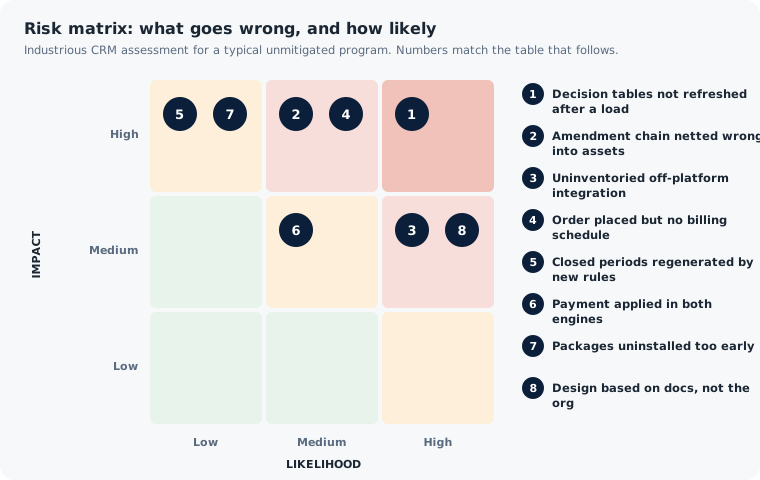
| # | Risk | Early warning sign | Mitigation |
|---|---|---|---|
| 1 | Decision tables not refreshed after a load | Load reports success; quoting fails or returns stale prices | Automate pricing sync and table refresh as a required pipeline step, then run a smoke-test quote |
| 2 | Amendment chain netted wrongly into assets | ARR or renewal totals drift after a wave | Penny-level control totals and stratified comparisons; Finance sign-off per wave |
| 3 | Uninventoried off-platform integration | Month-end feed or portal breaks after cutover | Phase 0 off-platform sweep; anti-corruption layer in front of both systems |
| 4 | Order placed but no billing schedule | Orders succeed, invoices never appear | Supply billing data on every order path; check a billing schedule exists after placement |
| 5 | Closed periods regenerated by new rules | Historical totals change | Archive and lock posted history; regenerate open periods only |
| 6 | Payment applied in both engines | Duplicate cash application, AR mismatch | Single payment router keyed on invoice source system |
| 7 | Packages uninstalled too early | Legacy data deleted before audit | Uninstall only after a full audit cycle, archive and sign-off |
| 8 | Design based on docs, not the org | Actions or features missing or license-gated | Probe the target org first; design against what it actually exposes |
A talented team improvising on a product it's seeing for the first time can absolutely succeed. It just risks learning each of these lessons the expensive way, on your revenue engine, in front of your auditors. A method exists so the lessons are already learned.
Planning checklists
Use these checklists to pressure-test a plan, whoever delivers it.
How Industrious CRM approaches this
Industrious CRM treats the CPQ-to-Revenue Cloud transition as what it is, a re-implementation of quote-to-cash, and wraps it in a method built to remove the risks this guide describes.
- Measure before you commit. A fixed-scope Phase 0 probes your actual org, inventories your dependencies on and off the platform, and settles the expensive decisions (revenue-recognition system of record, payment end state, archive strategy) before anyone commits to a build. You leave with a costed plan and a measured timeline, whoever builds it.
- Bring accelerators, not just hours. The org-capability probe, dependency inventory, golden-quote parity harness and idempotent migration framework take care of the parts that are the same for everyone, so senior effort goes to the part that's specific to your org.
- Build for coexistence and reversibility. Revenue Cloud runs alongside your legacy packages behind an anti-corruption layer and a routing flag. Small waves, penny-level reconciliation with Finance's signature, parallel shadow billing before any billing cutover, and legacy kept live and read-only until a full audit cycle has passed.
- Be honest about the timeline. We'll tell you where your dependency footprint and renewal cadence put you in the range, because a realistic plan is the only one that survives production.
Frequently asked questions
Is Salesforce CPQ end of life?
No. Salesforce CPQ and Salesforce Billing are end of sale: Salesforce no longer sells them to new customers and isn't developing new features for them. Existing customers keep support, can renew and can add licenses. Salesforce hasn't announced an end-of-life date and isn't forcing anyone to migrate.
Can Revenue Cloud run in the same org as CPQ and Billing?
Yes. Salesforce documents coexistence when the CPQ and Billing packages are provisioned, the Revenue Cloud Advanced and Revenue Cloud Billing licenses are present, and Billing in Revenue Cloud is enabled. Coexistence is what makes a phased, reversible cutover possible.
Is there a tool that migrates CPQ to Revenue Cloud automatically?
Not for your logic. Partner tools (and tooling Salesforce has discussed on its roadmap) help with assessment, data extraction, mapping and validation. Price rules, Quote Calculator Plugin scripts, custom Apex, integrations and templates still need to be redesigned and rebuilt, and the results verified.
How long does a migration take?
Salesforce describes 3–6 months as typical, with complex implementations taking longer. Industrious CRM's estimate for complex enterprise orgs is about 6–12 months, driven by the build, testing, data migration and a dual-run billing period. Your renewal cadence, finance close, dependency footprint and data volume set where you land.
What happens to historical invoices and closed revenue schedules?
Archive them with their original dates and amounts, and lock them. Never regenerate closed or posted periods. Only the open, unbilled remainder of active subscriptions should be regenerated in Revenue Cloud, then checked against what the legacy system would have produced.
Do customers have to re-enter their card details?
Usually not. With token-based gateways, card data lives in the gateway's vault and Salesforce holds only references. The migration re-links those references to the new invoice and billing records.
Sources and further reading
Salesforce product facts in this guide were checked against these official Salesforce sources in October 2026. Salesforce changes product names, features and licensing by release; always confirm against your own org and current documentation.
- Salesforce: Salesforce CPQ Not End of Life: What End of Sales Means (July 10, 2026)
https://www.salesforce.com/sales/cpq/end-of-life/ - Salesforce Help: Manage Your Quotes with Salesforce CPQ (end-of-sale notice)
https://help.salesforce.com/s/articleView?id=sales.cpq_package_orders.htm&language=en_US&type=5 - Salesforce Help: Salesforce CPQ Help Documentation Has Moved to PDF Format
https://help.salesforce.com/s/articleView?id=005388761&type=1 - Salesforce Developers: Salesforce CPQ Developer Guide
https://developer.salesforce.com/docs/revenue/cpq-developer-guide/guide/cpq-api-get-started.html - Salesforce Help: Migrate to Revenue Management
https://help.salesforce.com/s/articleView?id=ind.rev_cloud_asset_migration.htm&language=en_US&type=5 - Salesforce: CPQ Migration (strategies and rollout options)
https://www.salesforce.com/sales/cpq/migrations/ - Trailhead: CPQ Administrator Certification Maintenance, Spring '26 (Revenue Cloud coexistence)
https://trailhead.salesforce.com/content/learn/modules/cpq-administrator-certification-maintenance-spring-26/maintain-your-cpq-administrator-certification-for-spring-26 - Trailhead: Price Management with Revenue Cloud: Explore Salesforce Pricing
https://trailhead.salesforce.com/content/learn/modules/price-management-with-revenue-cloud/explore-salesforce-pricing - Revenue Management Developer Guide: ProductSellingModel
https://developer.salesforce.com/docs/atlas.en-us.revenue_lifecycle_management_dev_guide.meta/revenue_lifecycle_management_dev_guide/sforce_api_objects_productsellingmodel.htm - Revenue Management Developer Guide: Place Quote
https://developer.salesforce.com/docs/atlas.en-us.revenue_lifecycle_management_dev_guide.meta/revenue_lifecycle_management_dev_guide/connect_resources_place_quote.htm - Revenue Management Developer Guide: AssetAction
https://developer.salesforce.com/docs/atlas.en-us.object_reference.meta/object_reference/sforce_api_objects_assetaction.htm - Revenue Management Developer Guide: AssetStatePeriod
https://developer.salesforce.com/docs/atlas.en-us.object_reference.meta/object_reference/sforce_api_objects_assetstateperiod.htm - Revenue Management Developer Guide: Pricing Data Sync
https://developer.salesforce.com/docs/atlas.en-us.revenue_lifecycle_management_dev_guide.meta/revenue_lifecycle_management_dev_guide/connect_resources_pricing_data_sync.htm - Trailhead: Billing Management with Revenue Cloud: billing policies and treatments
https://trailhead.salesforce.com/content/learn/modules/billing-management-with-revenue-cloud/create-billing-policies-and-treatments - Trailhead: Billing Management with Revenue Cloud: tax policies and treatments
https://trailhead.salesforce.com/content/learn/modules/billing-management-with-revenue-cloud/configure-taxes - Revenue Management Developer Guide: GeneralLedgerAcctAsgntRule
https://developer.salesforce.com/docs/atlas.en-us.revenue_lifecycle_management_dev_guide.meta/revenue_lifecycle_management_dev_guide/sforce_api_objects_generalledgeracctasgntrule.htm - Salesforce Help: Uninstall a Managed Package
https://help.salesforce.com/s/articleView?id=sf.distribution_uninstalling_packages.htm&language=en_US - Tooling API: MetadataComponentDependency (Beta)
https://developer.salesforce.com/docs/atlas.en-us.api_tooling.meta/api_tooling/tooling_api_objects_metadatacomponentdependency.htm - Salesforce: Data 360 (formerly Data Cloud)
https://www.salesforce.com/data/
Get a re-implementation blueprint for your org
You've read the strategy. The next useful step is seeing what it means for your org.
OrgBuilder, from Industrious CRM, connects to your legacy Salesforce CPQ and Billing org with read-only access and produces a Revenue Cloud re-implementation blueprint. It's a starting point for scoping Phase 0, measured from your org rather than guessed.
- Read-only. OrgBuilder reads your configuration. It doesn't change anything in your org.
- Grounded in your org. The blueprint is built from what your org actually contains, not from a generic template.
- Useful whoever does the work. Use it to brief your internal team, your Salesforce account team or any implementation partner.
Request your blueprint: email support@industriouscrm.com
No obligation. Industrious CRM is a Salesforce consulting firm based in the Greater Toronto Area, Canada.